

FAQ
What is an FAQ?
FAQ stands for Frequently Asked Questions. This means that this section provides answers to commonly asked questions. So if you have any further questions, do have a look here. If you can’t find the answer here, please check out the further support.
FAQ
Finding pages
Dashboard
You can find the dashboard at dash.galaxybot.app. There, you can configure all the settings for your server.
Team Dashboard
You can find our Team Dashboard at teams.galaxybot.app. Here, you can view mod, support and ticket cases, manage users and your team, or use our application system.
Status
Outages can happen – or is maintenance perhaps scheduled? You can view this and further information on the status of all our systems here:
- Server status: https://status.galaxybot.app/
- Cluster status: https://status.galaxybot.app/?category=Clusters
- List of issues: https://status.galaxybot.app/incidents
Documentation
What do you mean, you can’t find our documentation? I think you’re currently on this page. Do have a look around – there are loads of great explanations about our modules here: https://docs.galaxybot.app/en/modules/modules
Invite GalaxyBot
You can easily invite the bot via our dashboard. It will detect whether the bot is on the server or not and give you the option to add it.
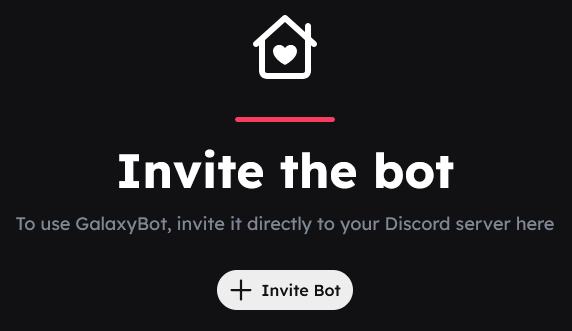
Alternatively, there are two other ways to invite our bot to the server:
- Via https://galaxybot.app/go/invite
- Via @GalaxyBot#1394 > Add app
Experts
What are experts?
We have experts on our Discord server. They have a particularly good understanding of the bot as a whole and actively provide support in the #helpdesk. Experts are not team members, but they do have certain privileges over normal users. All experts provide voluntary support in the #helpdesk.
How do I become an expert?
You must meet the following requirements:
- Be familiar with GalaxyBot and Dashboards
- Be friendly and helpful
- Be active and make valuable contributions to the HelpDesk
Experiments
What are Experiments?
Experiments allow us to enable new features on a per-server basis. This means we can test features on a small scale first and, if necessary, remove them again if they do not work.
How do you get an experiment?
As this is a test, you cannot apply for an experiment. We decide ourselves when a feature is ready and on which servers it will be rolled out.
Roles are greyed out
If the role is greyed out and this icon is displayed, the bot cannot change this role.
To resolve this issue, you need to drag the GalaxyBot role right to the top of your server’s role list.
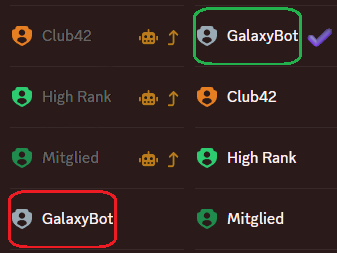
On desktop
- Go to your server > Server settings > Roles
- Hover your mouse over the
GalaxyBotrole - Hold down the mouse button and drag upwards
On mobile
- Go to your server > Settings > Roles
- Tap Rearrange
- For the
GalaxyBotrole, hold down and drag upwards
Application not responding
If an interaction with our bot has failed, this does not necessarily mean that our bot is not working. This is usually due to incorrect or missing settings. You can find the instructions for all our modules here.
Dashboard unavailable
If your dashboard is no longer available, this will be indicated on the dashboard.
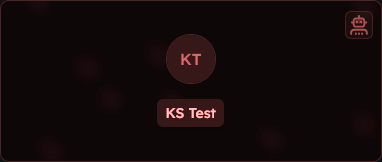
This may be the case if:
- the cluster is down
- maintenance work is taking place
Unable to upload file
Your file is probably either too large or in an unsupported file format. The following formats are supported:
The maximum file size is 10 MB.
GalaxyBot App
GalaxyBot does not have an app. Everything runs via our dashboards (Standard Dashboard and Team Dashboard), although our dashboards do support Progressive Web Apps. This means that compatible browsers install this page as an "application" or "app", but everything continues to run via the respective browser.
Browsers that support PWAs:
- Google Chrome (Windows, Linux, macOS, Android; limited on iOS and iPadOS)
- Microsoft Edge (Windows, Linux, macOS, Android; limited on iOS and iPadOS)
- Brave (Windows, Linux, macOS, Android; limited on iOS and iPadOS)
- Vivaldi (Windows, Linux, macOS, Android; limited on iOS and iPadOS)
- Opera (Windows, Linux, macOS, Android; limited on iOS and iPadOS)
- Safari (iOS; no push notifications on macOS and iPadOS)
- Mozilla Firefox (limited on iOS and iPadOS)
Tickets
Unable to select a category in Discord
Are you unable to open the list of categories in the panel in Discord?
- Have you created at least one category?
- Have you enabled the visibility for all categories?
Can’t send the ticket panel?
Can’t send your ticket panel? Please try the following – this should help:
- For embeds and categories, is there no visible in red?
- Does the bot have all the necessary permissions? (These can be found at the very top of Tickets)
- Has a channel been selected?
Ticket cannot be created
Are you unable to submit your ticket form? Please try the following – this should help:
- Does the bot have all the necessary permissions? (listed at the very top of Tickets)
- Is everything correct under Format?
- Are there any special characters that Discord does not support in channel names? (It’s best to avoid special characters, apart from hyphens)
- Is the format not too long? Bear in mind that variables will be replaced. (max. 100 characters)
- Are the placeholders supported?
Support
The bot kicks me out of the waiting room after 5 seconds
The bot cannot send a support notification. Please check the following:
- Does the bot have all the necessary permissions? (listed at the top of Support)
- Is a notification channel set up in the Support module?
I can’t take on a support case
- Does the bot have all the necessary permissions? (listed at the very top of Support)
- Are you in a voice channel on this server?
- Do you have the Team role?
- Duty role?
I can’t hear any hold music
- Does the bot have all the necessary permissions? (listed at the top of Support)
- Are you in the correct channel?
- Is the bot in the hold queue?
- Is hold music set up correctly?
Moderation
Anti-hoisting cannot be enabled
If you receive an error when trying to enable Anti-hoisting mode, please check the following:
- Is the server community enabled?
- Server settings > Enable community >
- In the window that now opens, tick both boxes > click on
- Set up the
Rules or Guidelines channeland theCommunity Updates channel> click on - Tick the box at the bottom next to
I understand and agree.> click on
- Is a rule already active?
- Server settings > Security settings > AutoMod > Members > Block words in member profile names or Anti Hoisting (if renamed by GalaxyBot)
- If a rule is already active, delete it by clicking on and selecting
Delete rule - You can now enable Anti Hoisting in the dashboard.
Apply to join us
You can find our careers page at:
On this page, you’ll find all our current vacancies and can apply directly.