Club Management
What can the Club Management module do?
With the Club Management module, you can require users to register before gaining access to your server. When a user registers, a modal opens where they must fill out a form you have configured. You can use the answers to change the user's nickname. For example, if you have a question "What's your name?", you could set the nickname format to ☀️ | %name%. If the user enters Pluto as their answer, the nickname would be set to ☀️ | Pluto.
Setup
Activate registration
First, we need to activate the registration. Simply click the toggle to enable it.
Message - Channel
Next, we need to select a channel where the registration message will be sent, so users can register. As an example, we use the channel register.

Message - Embed
Next, click on
Edit embedThis opens the Embed Editor. Here you can enter a title and a description. Optionally, you can also add images. In our example, we use Registration as the title and Register here! as the description.
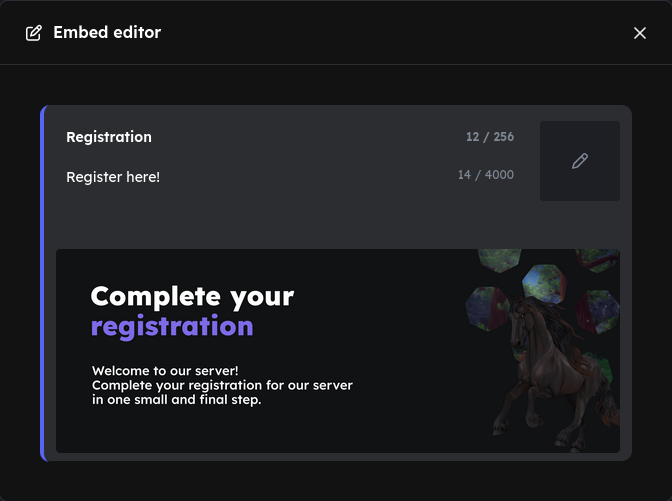
Once the embed looks the way you want, press
Send messageProtocols
You then have the option to activate protocols. Both of the following options are optional, but note: "Check registrations" can only be enabled if "Activate protocol" is turned on.
If you enable both options, your settings should look something like this:

Actions
Here you define what should happen after a successful registration. There are three options: set nickname, add roles, and remove roles. All three options are optional.
name, you can set the nickname format to ☀️ | %name%. When the user registers and enters Pluto as their answer, the bot would set the nickname to ☀️ | Pluto.Registered).Unregistered).Form
As the last step, configure the form — the questions that users must answer. You must add at least one question. Click the icon to create a new question.
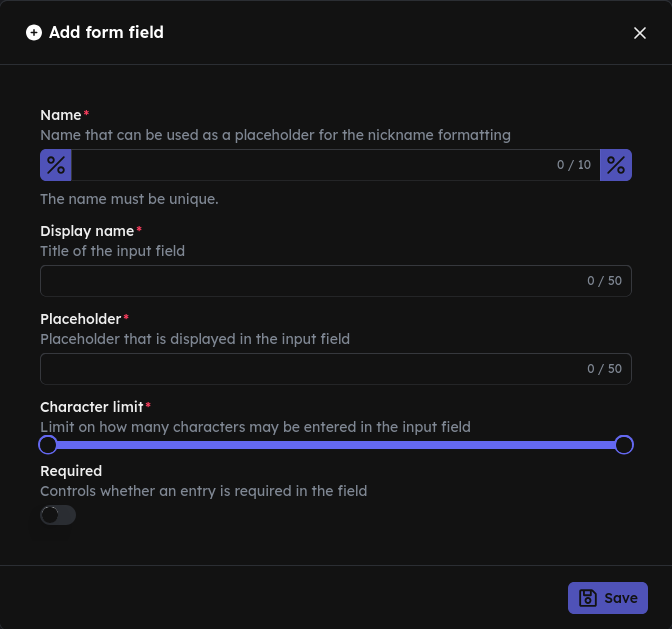
As an example, we create the question "What's your name?". When you click the icon, the following fields are shown:
name.What's your name?Max MustermannWhen you are done with your settings, click
Saveto save your settings.
You can add more questions by clicking the icon again.
If you wish to set up the nickname formatting, return to that step now.
Result
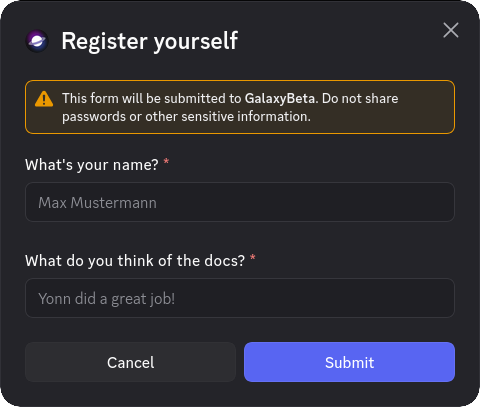
When a user registers, they will see this modal. The questions vary depending on what you have configured in the dashboard.