

Welcome
What can the Welcome module do?
With the Welcome module, you can automatically send a message to a channel when a user joins or leaves the server. Furthermore, new members can automatically receive one or more roles when joining the server.
Setup
In the Welcome module there are three different modules. These include:
- Welcome message
- Goodbye message
- Auto roles
Welcome message
With the Welcome message, you can send a message when a user joins the server. To use the Welcome message, activate this first.
Enable

Channel
Next, you need to select the channel where the Welcome message should be sent. In our example, we use the #join channel.

Edit Embed
Now we need to adjust the embed that is sent when someone joins the server. Press
Edit EmbedNow the Embed Editor opens, let's make some adjustments. As the title, we set "Welcome". As the description, we set "Welcome %MENTION% to %SERVERNAME%, you are the %TOTALUSERCOUNT% member! We're glad you're here!".
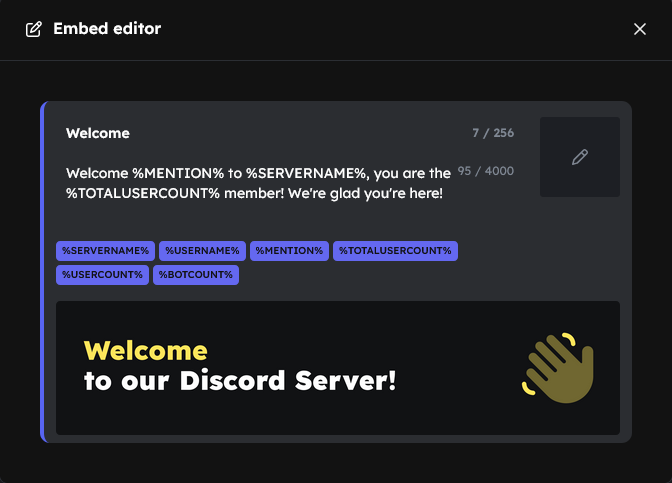
Supported placeholders are:
Goodbye message
The Welcome module can also send a Goodbye message when someone leaves the server. To use this feature, enable it first.
Enable

Channel
Next, you need to select the channel where the Goodbye message should be sent. In our example, we use the #leave channel.

Edit Embed
Now you need to adjust the embed that is sent when a person leaves the server. Click on
Edit Embedto open the Embed Editor. As the title, we set "Goodbye". As the description, we set "%USERNAME% has left %SERVERNAME%!".
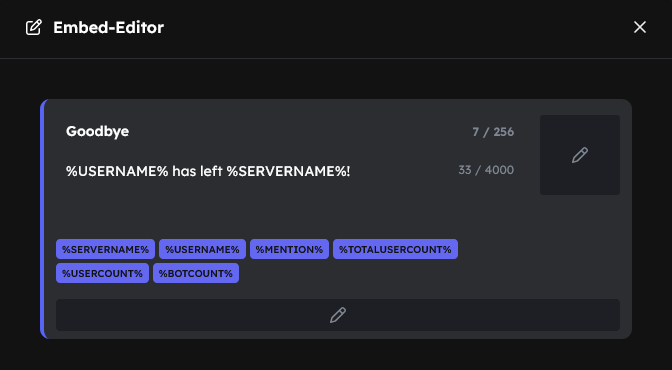
Supported placeholders are:
Auto Roles
If you want users to automatically receive one or more roles when joining, you can enable Automatic Roles.